WAF
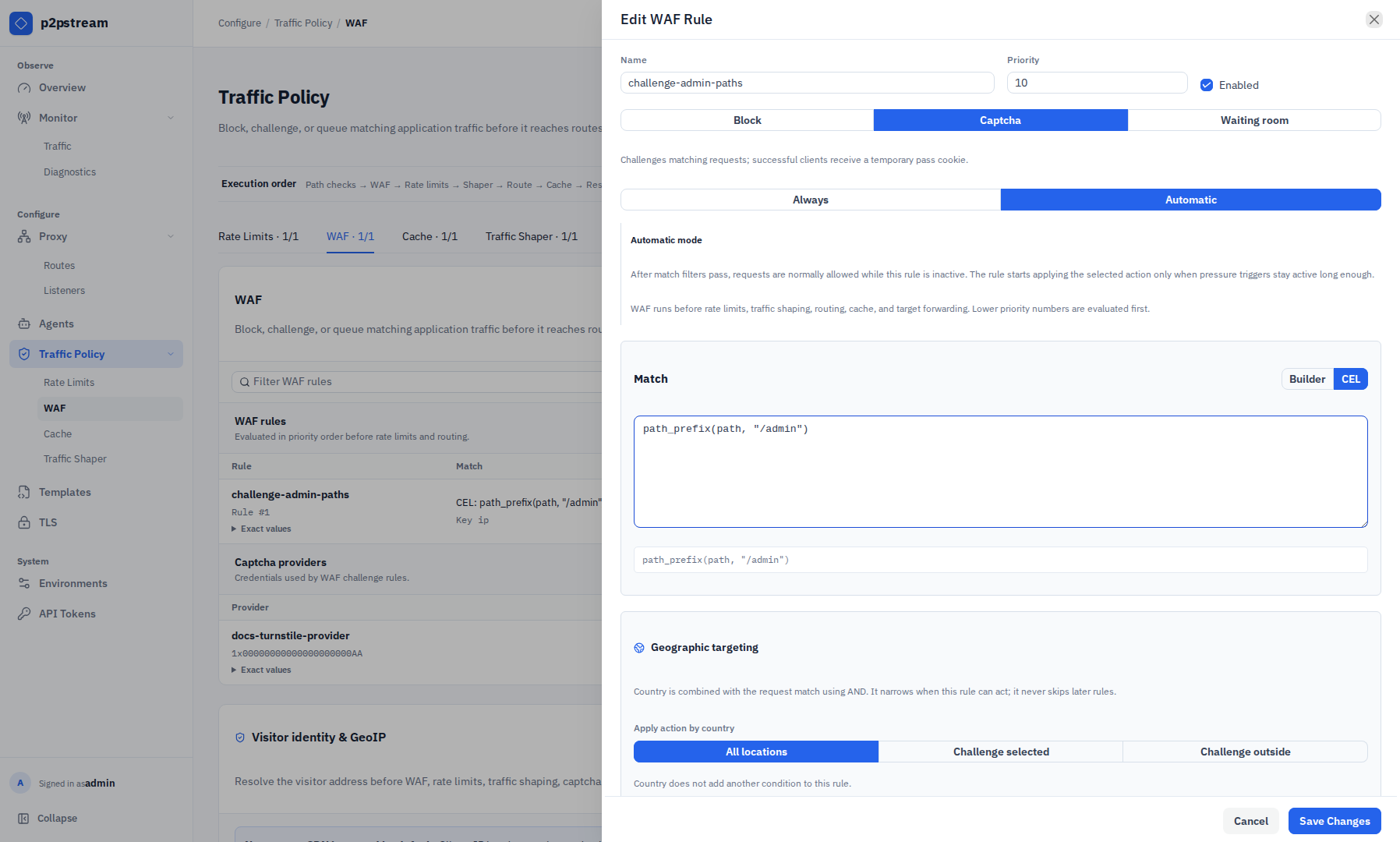
The WAF is a global public proxy policy layer that can block, challenge, or queue matching HTTP requests before they reach routing.
What It Is
WAF rules run after ACME HTTP challenge bypass and reserved WAF endpoints, then before rate limits, traffic shaping, route resolution, and forwarding.
| Action | Behavior |
|---|---|
| Block | Returns the configured status, content type, body, and headers. |
| Captcha | Shows a challenge page and sets a signed pass cookie after verification. |
| Waiting room | Queues visitors and admits sessions gradually with signed cookies. |
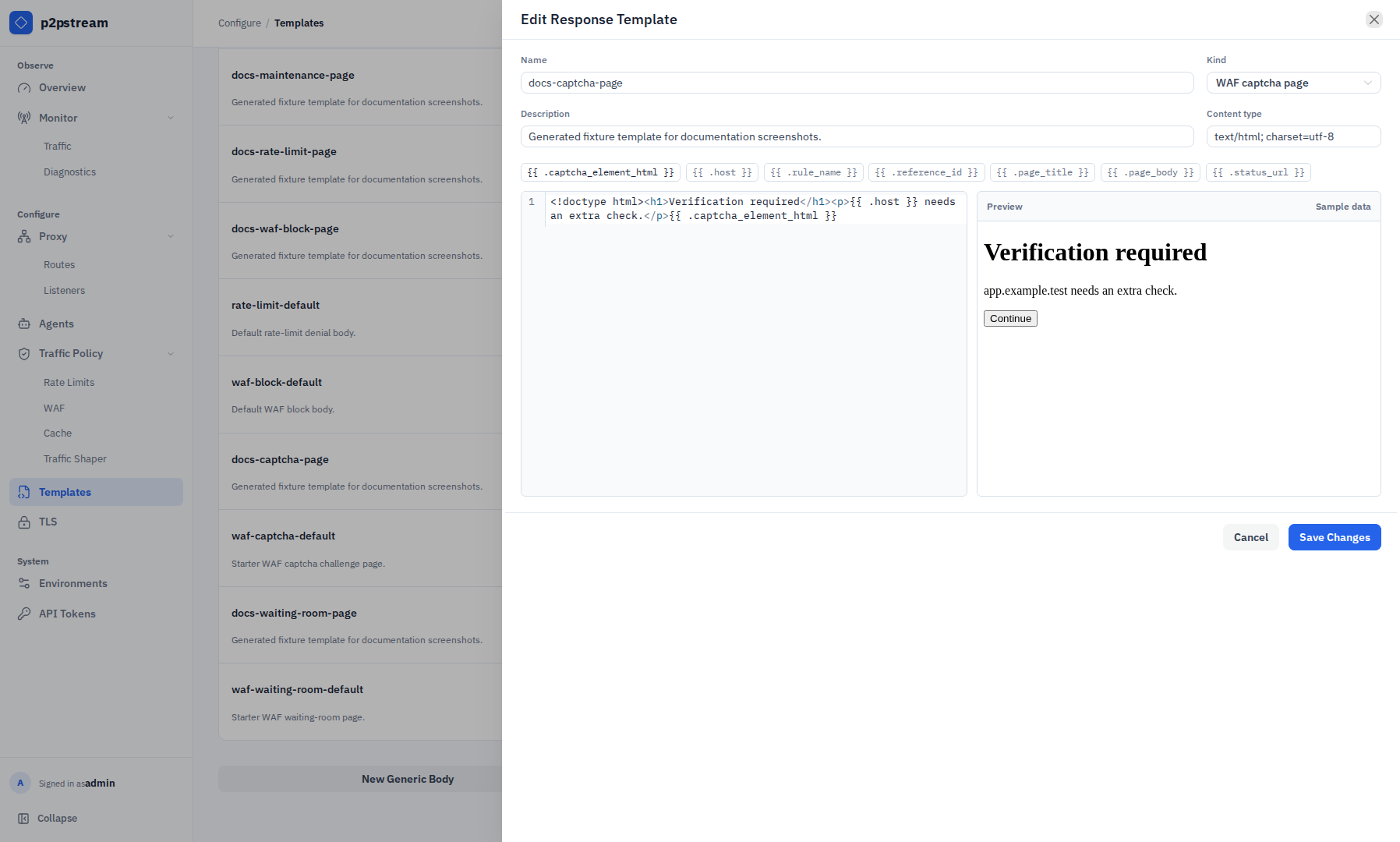
Block response bodies can be inline or selected from a central generic response template. Captcha and waiting-room actions can also use full HTML page templates with validated dynamic placeholders.
When It Matters
Use WAF rules for broad HTTP load reduction, login pressure, bot checks, temporary queueing, or protecting a target during short demand spikes.
Runtime Behavior
Rules are ordered by priority, then ID. The first enabled matching rule wins. Match fields reuse the same policy matcher model as rate limits: method, protocol, host pattern, path prefix, headers, cookies, and query parameters. An optional country restriction further narrows a WAF rule using a local GeoLite2 database. Key parts identify a visitor or policy bucket and default to remote IP.
When a CDN or reverse proxy sits in front, administrators can explicitly trust Cloudflare, Bunny, CloudFront, or custom peer CIDRs. p2pstream accepts the configured visitor-IP header only after the connection peer passes that trust check; no provider is trusted by default.
p2pstream supports Cloudflare Turnstile, hCaptcha, and Google reCAPTCHA v2 checkbox providers. Captcha verification uses the provider siteverify endpoint with a 3 second timeout. On success, p2pstream sets a signed p2pstream_waf_<rule_id> pass cookie and redirects with 303 See Other.
Custom captcha pages must include {{ .captcha_element_html }} so the server-generated challenge form is present.
Waiting room state is in memory. Queue and admission state are also stored in signed cookies. New visitors enter FIFO order; when capacity and rate allow, p2pstream sets an admission cookie and redirects with 303 See Other; otherwise it returns a branded 503 waiting-room page with Retry-After.
Custom waiting-room pages must include {{ .queue_position }} and {{ .retry_after_seconds }} so visitors can see queue state and poll timing.
Automatic waiting-room activation can use request rate, traffic spike, proxy active requests, target active requests, agent active requests, server CPU, and agent CPU pressure signals.
Manage these controls under Traffic Policy → WAF. The filterable WAF rules table and captcha providers appear first. Visitor identity & GeoIP is a separate section on the same tab because its trusted-source and country-database settings affect WAF country restrictions and any policy keyed by resolved client identity. Use Request Tester to validate a representative request against the current policy configuration.
Common Mistakes
- Treating WAF as volumetric DDoS protection; saturated links and L3/L4 attacks require upstream protection.
- Challenging
POSTor upload clients that cannot resubmit after the browser receives a pass/admission cookie. - Using remote IP without explicitly configuring the front proxy that makes all clients look identical.
- Enabling a trusted CDN while leaving the origin directly reachable from the internet.
- Using fail-open unknown-country handling for an allow-only rule without intending that bypass.
- Leaving automatic waiting-room trigger thresholds too broad for normal traffic.
- Selecting a generic body template for a captcha or waiting-room page; those actions require WAF page template kinds.