Response Templates Reference
Response templates are centrally managed response bodies that can be reused by static route targets, rate-limit responses, and WAF responses while keeping inline bodies available for one-off cases.
Template Kinds
| Kind | Use | Runtime behavior |
|---|---|---|
| Generic body | Static target bodies, rate-limit response bodies, and WAF block bodies. | The body is reused exactly as stored. Placeholders are not rendered. |
| WAF captcha page | Full HTML page for captcha WAF rules. | Rendered with html/template and sample-validated on save. |
| WAF waiting room page | Full HTML page for waiting-room WAF rules. | Rendered with html/template and sample-validated on save. |
Generic templates only replace the body text. The object that references the template still owns the HTTP status, content type, and headers. For example, a rate-limit rule still uses its configured response status and response content type even when the body comes from a template.
Create And Edit Templates
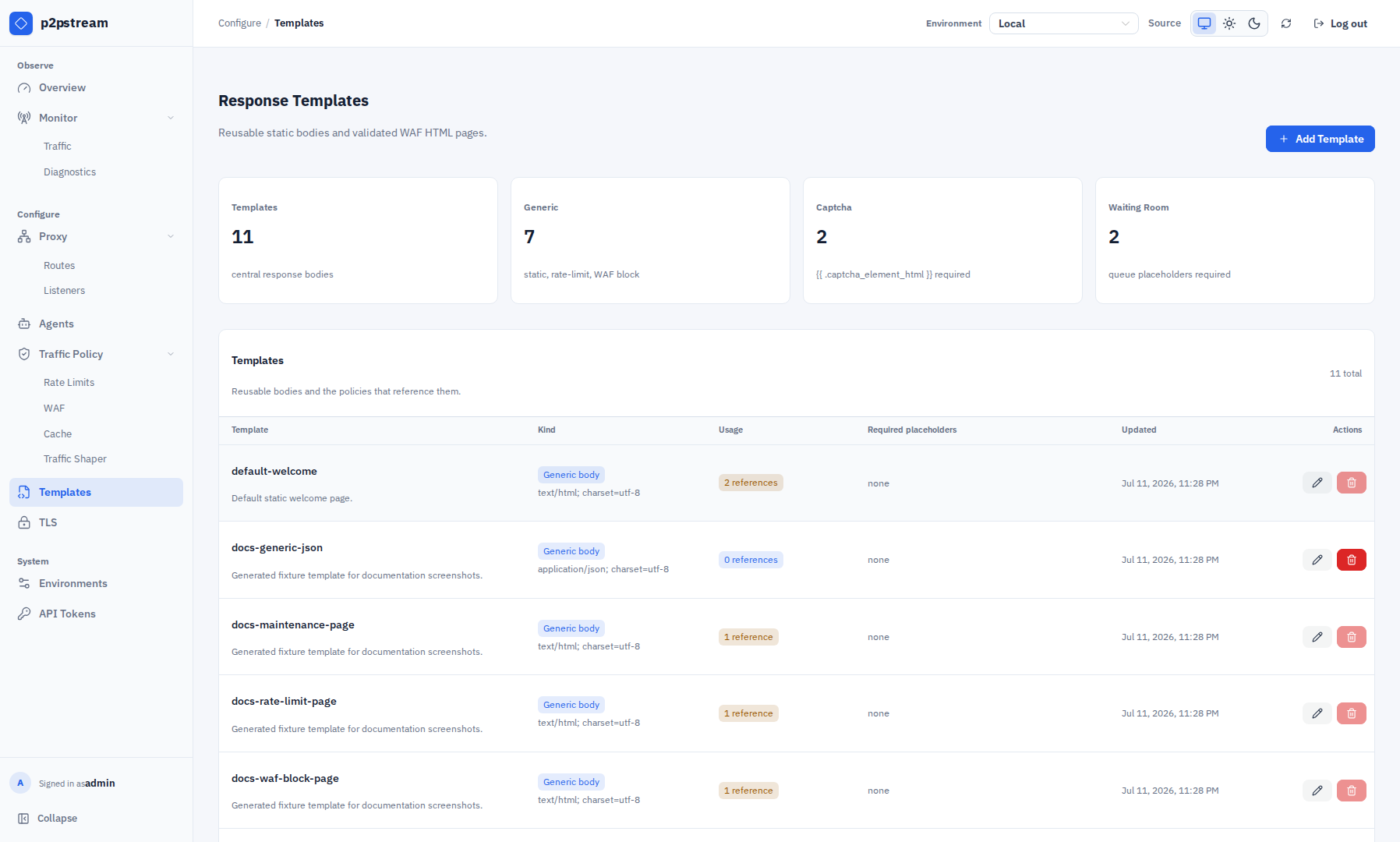
Choose Templates under Configure in the management UI. Summary cards show total, generic, captcha, and waiting-room counts. The compact template table shows name and description, kind and content type, usage count, required placeholders, updated time, and actions.
- Choose Add Template.
- Select the template kind.
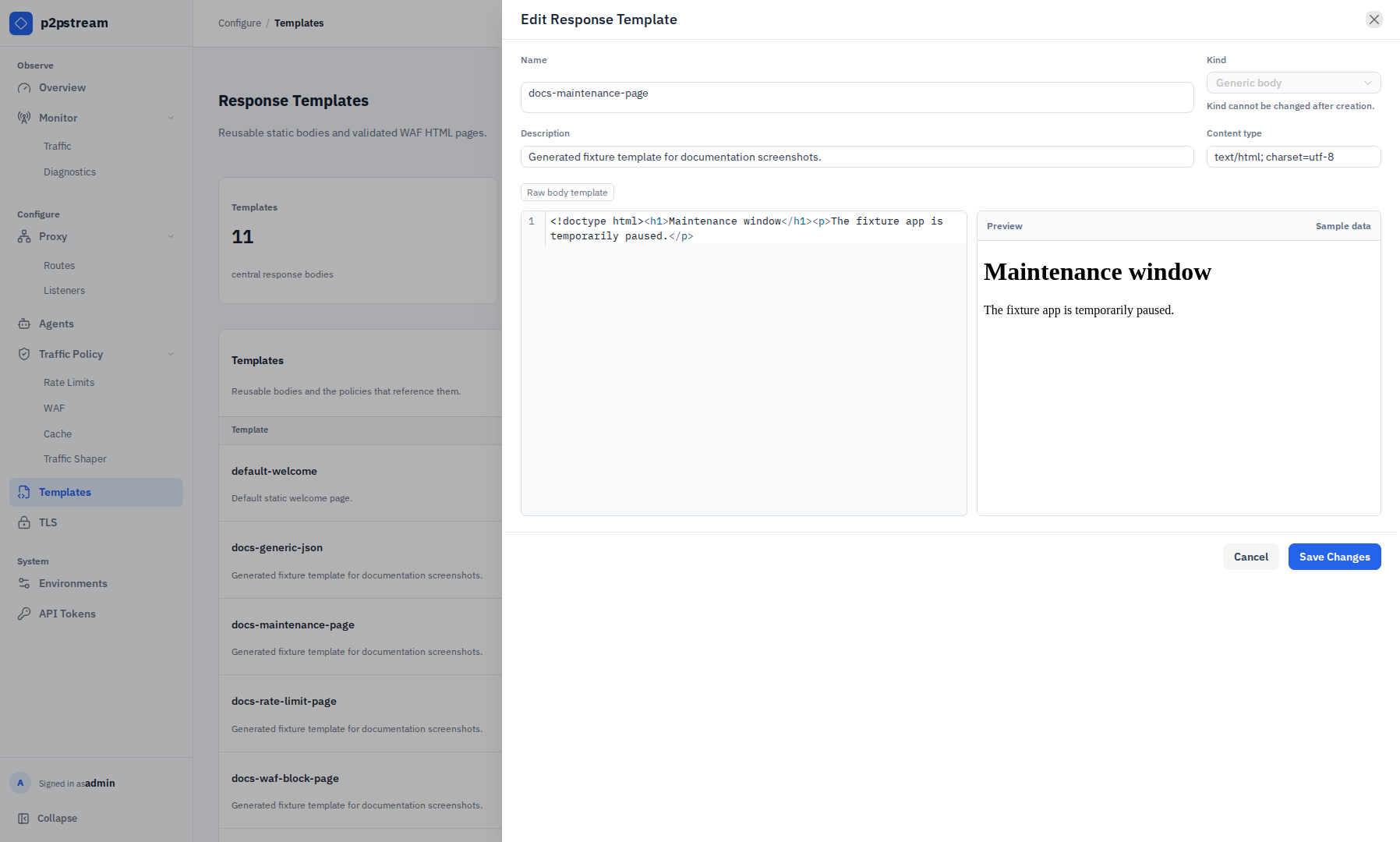
- Set a name, description, content type, and body.
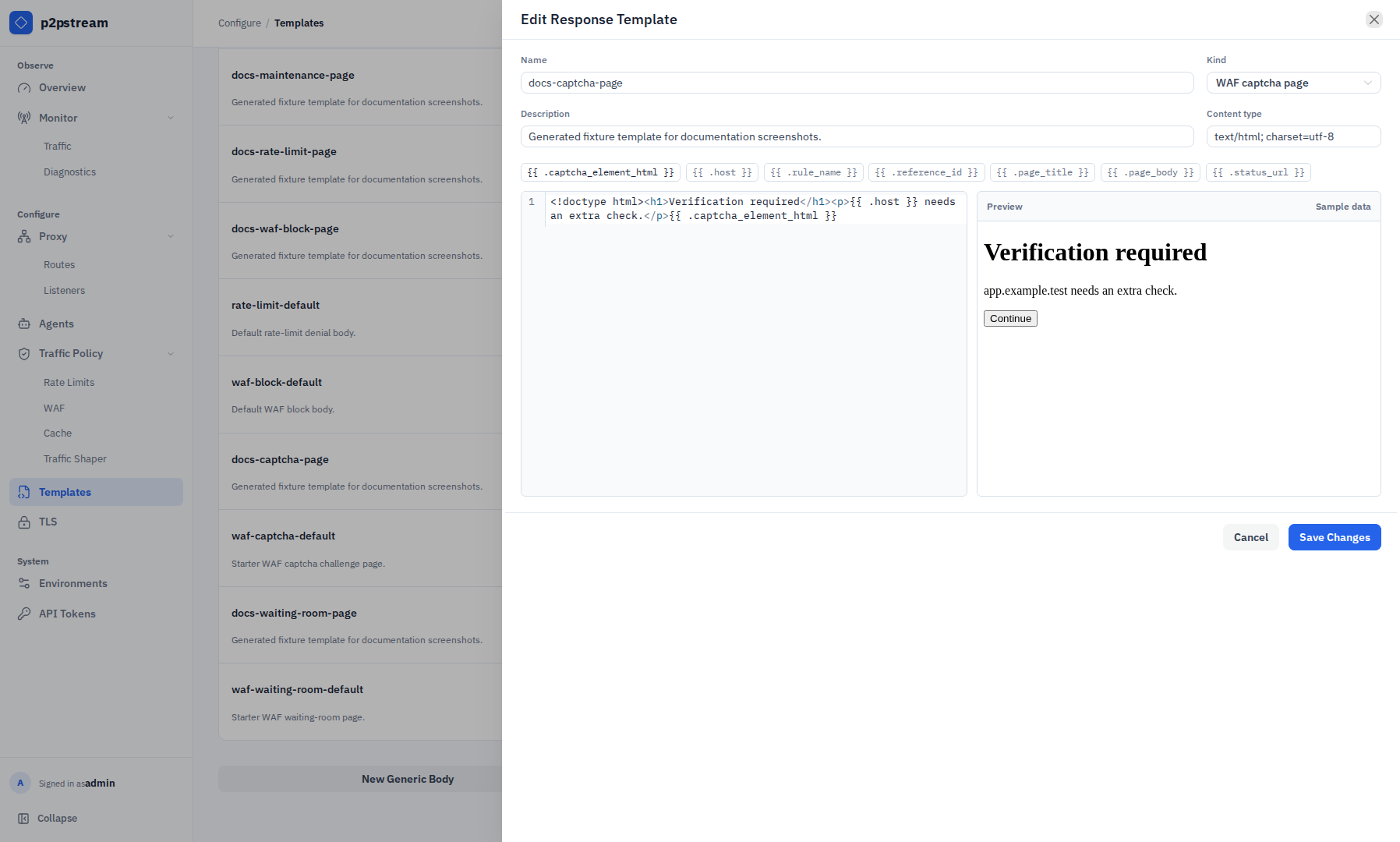
- Use the HTML editor for page templates. It includes HTML autocomplete, Emmet expansion with
Tab, placeholder autocomplete, and a live preview with sample values. - Save the template, then select it from the relevant rate-limit or WAF rule drawer. The API supports selecting a generic template for a static route target, but the current route drawer exposes inline static bodies only; configure that association through the management API.
The New Generic Body, New Captcha Page, and New Waiting Room shortcuts below the table open the same drawer with the corresponding kind preselected.
Template names follow the same public resource name rules as listeners, routes, targets, and rules: 1 to 64 characters, starting with an alphanumeric character, using only letters, numbers, dots, dashes, and underscores.
Template kind is immutable after creation, so the edit drawer locks Kind. To change a generic body into a WAF page template, create a new template of the target kind and move references to it.
Placeholders
Generic templates are raw bodies. Placeholder text such as {{ .host }} remains literal in generic templates.
WAF page templates support these placeholders:
| Placeholder | Required for | Description |
|---|---|---|
{{ .captcha_element_html }} | WAF captcha page | Server-generated captcha widget, hidden fields, and submit form. This value is trusted server HTML. |
{{ .queue_position }} | WAF waiting room page | Visitor's current queue position. |
{{ .retry_after_seconds }} | WAF waiting room page | Seconds until the browser should check admission again. |
{{ .host }} | Optional | Request host shown to the visitor. |
{{ .rule_name }} | Optional | Name of the WAF rule rendering the page. |
{{ .reference_id }} | Optional | Short reference ID for support and logs. |
{{ .page_title }} | Optional | Configured page title. |
{{ .page_body }} | Optional | Configured page body copy. |
{{ .status_url }} | Optional | Captcha verification endpoint or waiting-room status endpoint. |
Normal placeholder values are escaped by html/template. Only captcha_element_html is inserted as trusted HTML, because it is generated by the server.
Validation Rules
On create or update, p2pstream:
- requires valid UTF-8 bodies,
- limits generic bodies to 64 KiB,
- limits WAF page templates to 128 KiB,
- parses WAF page templates with
html/template, - rejects unknown WAF placeholders,
- rejects missing required WAF placeholders,
- requires WAF page templates to use an HTML content type,
- executes WAF page templates with sample data to catch render errors.
Reference validation is kind-aware:
- Static targets, rate-limit rules, and WAF block responses can only select
generic_bodytemplates. - Captcha WAF rules can only select
waf_captcha_pagetemplates for captcha pages. - Waiting-room WAF rules can only select
waf_waiting_room_pagetemplates for waiting-room pages. - Captcha page templates cannot be selected for non-captcha WAF rules.
- Waiting-room page templates cannot be selected for non-waiting-room WAF rules.
Delete a template only after removing all references to it. The UI shows usage counts and disables deletion while the template is still referenced.
Runtime Effects
Generic body templates are resolved when the public proxy snapshot is built. If a referenced template is missing or has the wrong kind, the configuration is rejected until the reference is fixed.
WAF captcha and waiting-room page templates are rendered for each matching decision. Rendered WAF pages are served as HTML with Cache-Control: no-store. If a page template unexpectedly fails to render at runtime, p2pstream falls back to the built-in WAF interstitial page.
Examples
Generic maintenance body:
<!doctype html>
<html lang="en">
<head>
  <meta charset="utf-8">
  <title>Maintenance</title>
</head>
<body>
  <main>
    <h1>Maintenance in progress</h1>
    <p>Please try again soon.</p>
  </main>
</body>
</html>
Captcha page template:
<!doctype html>
<html lang="en">
<head>
  <meta charset="utf-8">
  <meta name="viewport" content="width=device-width, initial-scale=1">
  <title>{{ .page_title }}</title>
</head>
<body>
  <main>
    <h1>{{ .host }} security check</h1>
    <p>{{ .page_body }}</p>
    {{ .captcha_element_html }}
    <footer>Reference ID: {{ .reference_id }}</footer>
  </main>
</body>
</html>
Waiting-room page template:
<!doctype html>
<html lang="en">
<head>
  <meta charset="utf-8">
  <meta name="viewport" content="width=device-width, initial-scale=1">
  <meta http-equiv="refresh" content="{{ .retry_after_seconds }}">
  <title>{{ .page_title }}</title>
</head>
<body>
  <main>
    <h1>{{ .page_title }}</h1>
    <p>{{ .page_body }}</p>
    <p>Queue position: {{ .queue_position }}</p>
    <p>Next check: {{ .retry_after_seconds }} seconds</p>
    <a href="{{ .status_url }}">Check status</a>
    <footer>Reference ID: {{ .reference_id }}</footer>
  </main>
</body>
</html>