WAF Reference
WAF rules are global public proxy rules evaluated before rate limits, traffic shapers, route resolution, and target forwarding.
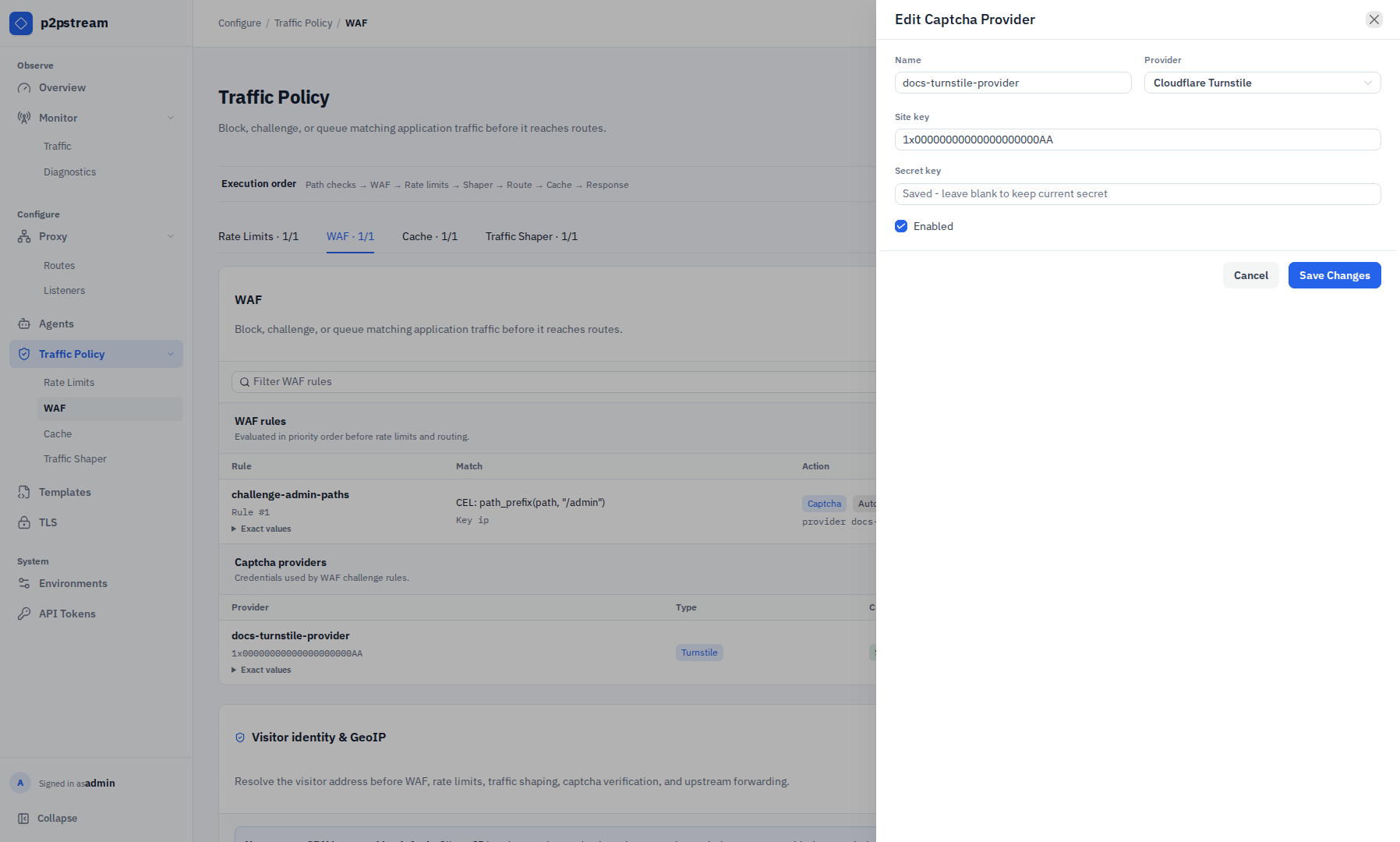
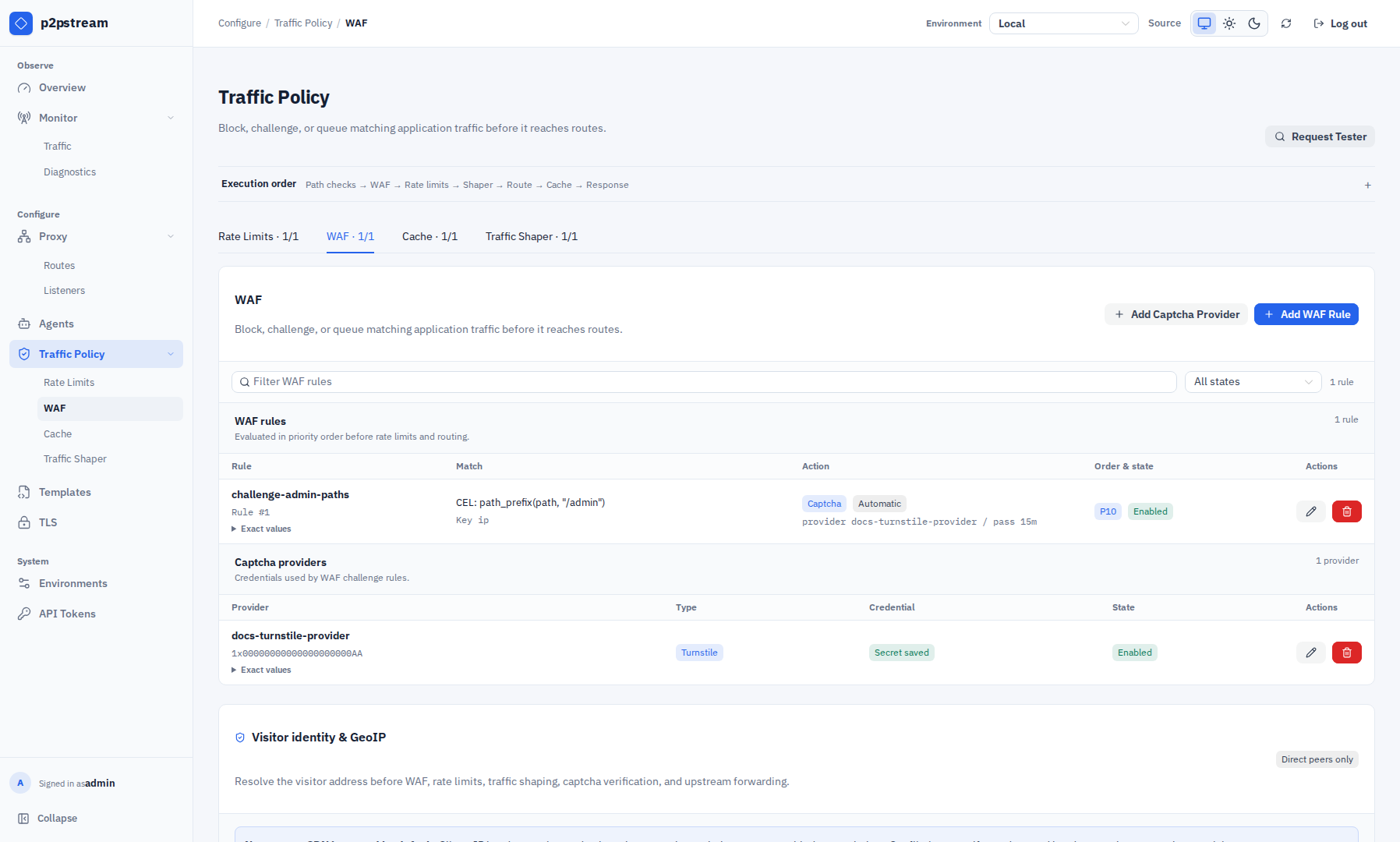
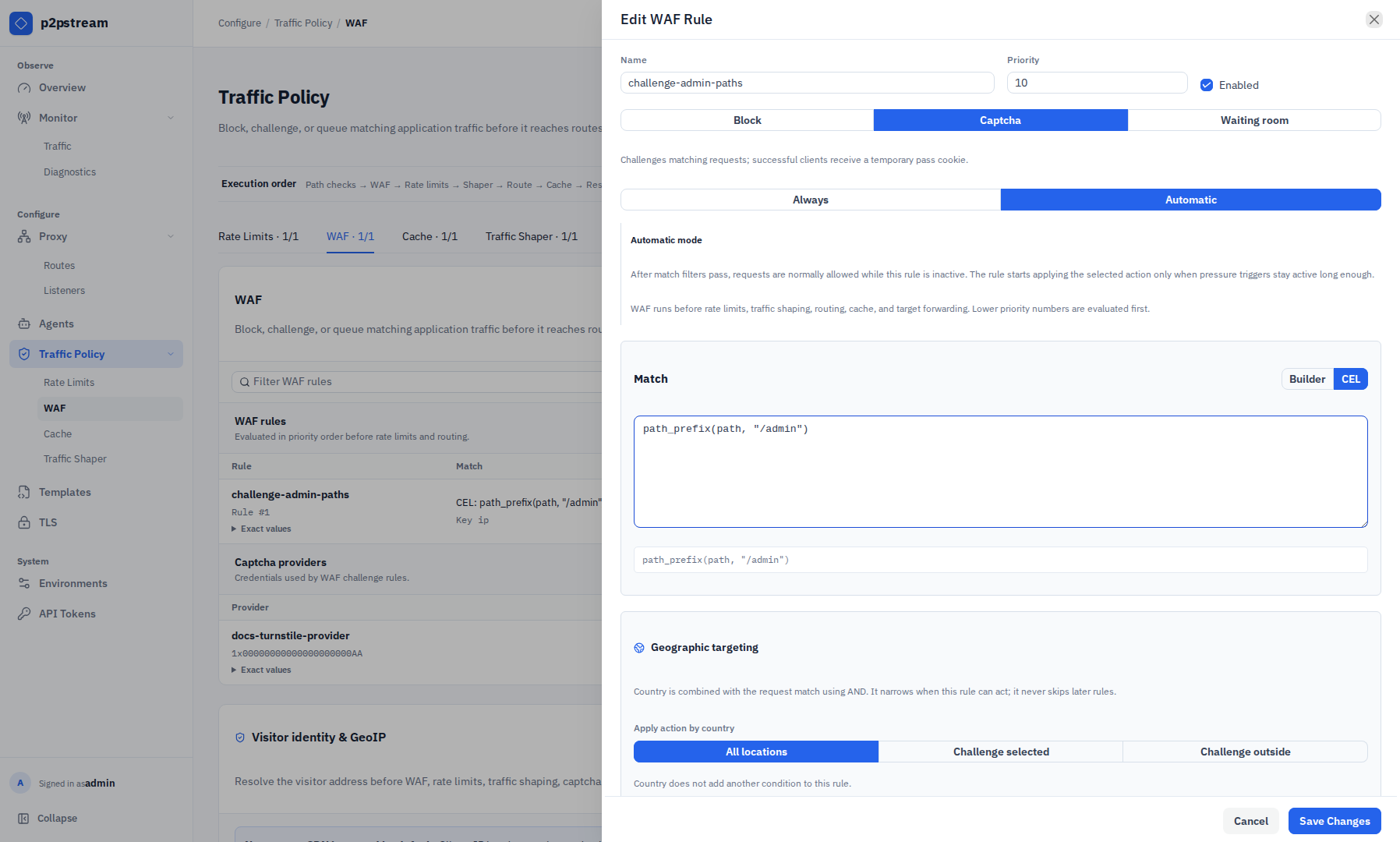
In the management UI, choose Traffic Policy -> WAF. The WAF tab contains separate dense tables for WAF rules and captcha providers, a text and enabled-state filter for rules, and the Visitor identity & GeoIP settings below them. The shared Request Tester can supply a synthetic country result to preview geographic targeting without sending a request through a public listener.
Exact Fields And Defaults
Reserved WAF endpoints:
| Path | Use |
|---|---|
/.p2pstream/waf/captcha/verify | Captcha form verification. |
/.p2pstream/waf/waiting-room | Waiting-room page endpoint. |
/.p2pstream/waf/waiting-room/status | Waiting-room status and admission check. |
ACME HTTP challenges bypass the WAF before these reserved endpoints are handled.
WAF rule defaults:
| Setting | Default or limit |
|---|---|
| Name | waf-rule when empty |
| Priority | 100 in database defaults |
| Action | Block |
| Activation mode | Always |
| Captcha pass TTL | 1800000 ms, 30 minutes |
| Captcha pass TTL range | 1 minute to 24 hours |
| Default key | remote IP |
| Block status | 403 |
| Block body source | Inline |
| Block content type | text/plain; charset=utf-8 |
| Block body | Request blocked\n |
| Block body limit | 64 KiB |
| Captcha page template | None |
| Waiting-room page template | None |
Waiting-room defaults:
| Setting | Default | Range |
|---|---|---|
| Max admitted sessions | 50 | 1 to 1,000,000 |
| Admission rate | 10/sec | 1 to 100,000/sec |
| Admission session TTL | 600000 ms | 1 minute to 24 hours |
| Queue poll interval | 5000 ms | 1 to 60 seconds |
| Queue timeout | 1800000 ms | 1 minute to 24 hours |
| Page title | Waiting room | non-empty custom text |
| Page body | Traffic is high. You will be admitted automatically. | non-empty custom text |
Automatic activation defaults:
| Signal | Default |
|---|---|
| Request window | 10000 ms |
| Minimum request rate | 50 rps |
| Traffic spike multiplier | 4 |
| Proxy active requests | 100 |
| Target active requests | 100 |
| Agent active requests | 50 |
| Server CPU | 85% |
| Agent CPU | 85% |
| Minimum active duration | 30000 ms |
| Quiet period | 60000 ms |
Validation Rules
Choose Add Captcha Provider under Traffic Policy -> WAF to configure Cloudflare Turnstile, hCaptcha, or Google reCAPTCHA v2 checkbox. Provider secret keys are required, stored server-side, and represented only as saved/not-saved state after creation; they are not sent back to the UI. Captcha rules require an enabled provider.
Block response template mode requires a selected generic_body response template.
Captcha page templates can only be selected for captcha WAF rules. The selected template must have kind waf_captcha_page and include {{ .captcha_element_html }}.
Waiting-room page templates can only be selected for waiting-room WAF rules. The selected template must have kind waf_waiting_room_page and include both {{ .queue_position }} and {{ .retry_after_seconds }}.
WAF rules use request-only CEL match_rule rules. Empty match rules match every request. See CEL Policy Matching for variables, helper functions, builder behavior, limits, and examples.
Route data, target data, target health, and load-balancer state are not available inside WAF match CEL. p2pstream may perform a route-only path security match before WAF, but WAF rules still run before route target selection.
WAF path matching uses p2pstream's decoded request path. On routes that allow encoded separators for upstream compatibility, avoid WAF rules that depend on decoded slash boundaries for authorization.
WAF key parts reuse rate-limit key sources: remote IP, host, method, path, protocol, header, cookie, and query parameter.
REMOTE_IP is the built-in client-IP identity source. With no trusted proxy enabled, it is the peer address seen by p2pstream and all client-IP headers are ignored. When the immediate peer belongs to an explicitly enabled trusted CDN or custom proxy source, p2pstream strictly resolves the visitor address from that source's configured header. A missing, malformed, or contradictory trusted header produces an unknown visitor address instead of trusting attacker-controlled input.
HEADER key parts remain supported for application headers such as X-Plan, but they cannot use forwarding or client-IP headers such as Forwarded, X-Forwarded-For, X-Real-IP, X-Forwarded-Host, X-Forwarded-Proto, X-Forwarded-Port, or common client-IP variants. Configure visitor identity through Visitor identity & GeoIP instead.
Before upgrading from an older version that allowed arbitrary header key parts, inspect stored WAF rules:
SELECT id, name, key_parts_json
FROM public_waf_rules
WHERE lower(key_parts_json) LIKE '%forwarded%'
   OR lower(key_parts_json) LIKE '%x-real-ip%'
   OR lower(key_parts_json) LIKE '%client-ip%'
   OR lower(key_parts_json) LIKE '%connecting-ip%';
Automatic trigger thresholds accept 0 to disable individual signals. CPU percentages are 0 to 100.
Country Restrictions
Country restrictions use an automatically refreshed local MaxMind GeoLite2 Country database. They are disabled until an administrator supplies a MaxMind account ID and license key and enables GeoIP under Traffic Policy -> WAF, in Visitor identity & GeoIP. Database credentials are stored server-side and the license key is never returned by the management API.
Set Up GeoLite2 Country
- Create a free GeoLite account and accept the terms that apply to your use.
- Generate a MaxMind license key. Record it when it is shown; MaxMind displays a new key only once.
- Enter the numeric account ID and license key in Visitor identity & GeoIP, select Enable GeoIP country lookups, and choose Save GeoIP settings. Saving enabled settings performs the initial database download; the save fails if no usable database can be installed.
- Monitor database state, build date, last successful refresh, last attempt, and any error shown in the UI. p2pstream checks hourly and refreshes a ready database after 24 hours; failed downloads leave the last valid database active.
- Use Refresh database only when you need to force a later refresh. Pending form changes must be saved or discarded first.
Permit outbound HTTPS to download.maxmind.com and MaxMind's current presigned-download host. MaxMind documents that host and its redirect behavior in Updating GeoIP and GeoLite Databases.
Operators remain responsible for the GeoLite license terms, including any attribution and data-retention obligations. MaxMind currently requires prompt updates and destruction of superseded databases within 30 days; investigate stale or failed refresh warnings rather than relying indefinitely on an old file.
This product includes GeoLite Data created by MaxMind, available from MaxMind.
Each WAF rule can target:
- selected countries, which applies the rule action only to listed country codes; or
- countries outside the selection, which is an allow-only pattern for a block rule.
The country restriction is combined with the ordinary request match using AND. For example, a selected-country restriction plus host app.example.com only targets visitors from those countries requesting that host. Rules still use normal priority and first-match behavior. An allow-only country rule does not skip later WAF rules if it does not match.
Unknown-country behavior is selected per rule:
| Behavior | Runtime effect |
|---|---|
| Apply rule | Fail closed. The configured block, captcha, or waiting-room action applies. |
| Bypass geo restriction | Fail open. This rule does not match the unresolved visitor. |
A country is unknown when p2pstream cannot resolve a trusted visitor IP, the database has no record, the IP is private or special-use, or no usable database is loaded. GeoIP is inherently approximate and should not be treated as proof of a person's physical location.
Trusted Proxies And CDNs
No proxy source is trusted by default. Built-in presets are available for Cloudflare, Bunny, and Amazon CloudFront, and each one must be explicitly enabled by an administrator. Provider address ranges are downloaded from the provider's official endpoint and refreshed in the background; the last valid range set remains active if a refresh fails.
The managed contracts are:
| Preset | Peer ranges and client-IP contract |
|---|---|
| Cloudflare | Cloudflare IP ranges API and the single-value CF-Connecting-IP header. |
| Bunny CDN | Bunny's origin IP allowlist and single-value X-Real-IP header. |
| Amazon CloudFront | AWS CLOUDFRONT_ORIGIN_FACING ranges, corresponding to its origin-facing managed prefix list, and CloudFront's append-only-at-the-edge X-Forwarded-For behavior. Viewer-edge-only CLOUDFRONT ranges are not trusted. |
Fastly is intentionally custom-only. Fastly publishes origin-facing ranges, but its default Fastly-Client-IP header is not protected from client modification. Configure Fastly VCL or an edge rule to overwrite a dedicated header, then add that header and the documented Fastly ranges as a custom single-IP source.
Custom trusted sources require one or more peer CIDRs, a header name, and a parser mode:
| Parser | Requirement |
|---|---|
| Single IP | The header must contain exactly one IP literal. Use this when the proxy overwrites a dedicated header. |
| Trusted chain | Parses an IP-only comma-separated chain from right to left, removes hops from enabled trusted-chain sources using the same canonical header, and selects the first untrusted address. Single-IP and different-header sources never enlarge that chain's trust domain. |
If the immediate peer is not trusted, forwarding headers never affect request identity. If multiple matching trusted sources disagree, identity resolution fails closed to unknown. Resolved visitor identity is used consistently by GeoIP, remote_ip CEL, rate-limit and shaper keys, captcha verification, and generated upstream client-IP headers. The network peer remains available internally for connection logging and reserved-endpoint abuse protection.
Application-level proxy trust does not prevent an attacker from reaching an exposed origin directly. Restrict the origin firewall to the selected CDN ranges whenever the deployment requires all traffic to traverse that CDN.
Runtime Effects
Rules are ordered by priority, then ID. The first enabled matching rule wins.
p2pstream verifies captcha tokens against the provider siteverify endpoint with a 3 second timeout. After success, it sets a signed p2pstream_waf_<rule_id> pass cookie and redirects with 303 See Other.
Waiting-room state is in memory. Admission and queue identity are stored in signed cookies. Valid admission cookies continue to pass after restart until expiry; queue cookies are accepted after restart, but visitors are re-enqueued because FIFO state is not persisted.
Custom WAF page templates are rendered with html/template. Normal placeholder values are escaped. The captcha element placeholder is trusted server-generated HTML so the provider widget and form can render.
Captcha and waiting-room passes only satisfy the matching WAF rule. The request still continues through rate limits, traffic shaping, route resolution, and target forwarding.
The original request body is never replayed after a captcha challenge or waiting-room admission.
Examples
Login captcha rule:
Action: Captcha
Host pattern: app.example.com
Path prefix: /login
Methods: POST
Key: remote IP
Captcha pass TTL: 1800000 ms
Automatic waiting room:
Action: Waiting room
Activation mode: Automatic
Host pattern: app.example.com
Minimum request rate: 50 rps
Target active requests: 100